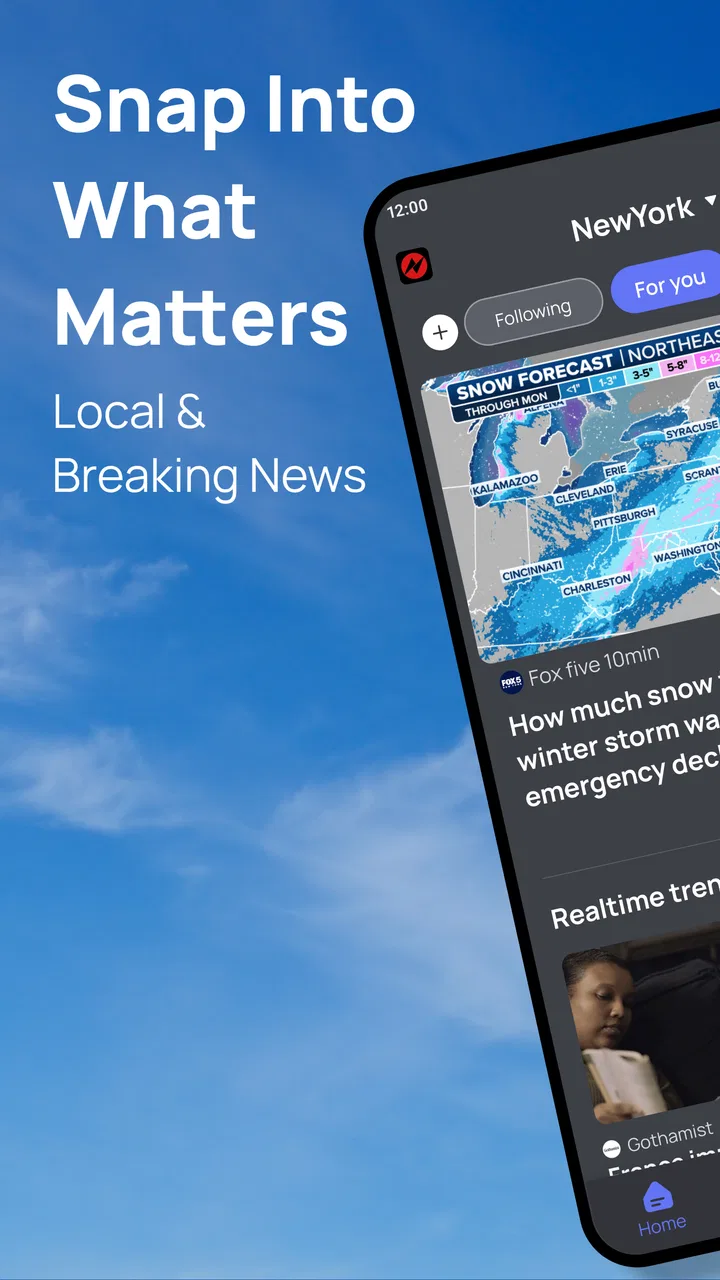
Snap News: Local & Alerts
- 4.3
- Rating
- 500.00K
- Installs
- Free
- Price

 Analysis by App-foxy
I approached Snap News: Local & Alerts as a practical news reader rather than a replacement for every publication I already follow. That distinction matters. Its role is to help me notice what is happening, especially when I want a quick view of community updates, developing stories, and nearby coverage without opening several separate sources. The app comes from Build4world, is free to use, and is aimed at an Everyone audience, so it feels accessible for casual readers as well as people who like checking headlines several times a day.
After spending time with it, my impression is that its value depends less on reading every article inside one sitting and more on building a repeatable checking habit. I can open it during a commute, scan what has changed, and decide which items deserve deeper attention elsewhere. That makes it most useful as a first stop: a way to spot relevant stories before the day gets busy. It is not the right choice for someone who expects a highly specialized newspaper, a fully personalized research tool, or a complete substitute for direct reporting from trusted outlets.
How I use Snap News as a daily news starting point
My baseline workflow is deliberately simple. I open the app when I have a short window, look for the most relevant updates, and avoid treating every headline as equally important. The combination of instant updates, trending material, and local coverage gives me three different reasons to check in. Immediate updates are useful when a story is developing, trending items show what is attracting wider attention, and local material can be more practical than national headlines when I am trying to understand what may affect my own day.
You May Also Like

 AccuWeather: Weather Radar
AccuWeather Review: A Quick, Clear Forecast for Everyday Decisions
For everyday plans, the best forecast is the one you can understand quickly. AccuWeather makes rain timing, radar, and local conditions easy to act on, with a few trade-offs.

 Hill Climb Racing
Why Hill Climb Racing Still Turns Crashes Into One More Run
A tiny car, a bumpy hill and one more upgrade: Hill Climb Racing keeps resurfacing because its simple chaos makes every near-miss feel personal.

 AliExpress - Shopping App
AliExpress Makes Global Shopping Feel Personal, but Shoppers Bear the Risk
AliExpress turns a global marketplace into a pocket-sized discovery engine. Its reach is useful, its shopping loop compelling, and its trade-offs easy to miss.

 Lords Mobile: Kingdom Wars
Lords Mobile Is a Kingdom-Building Routine, Not a Quick Match
A case-by-case verdict on the building, battles, device demands, and social commitments that make Lords Mobile rewarding for some players and exhausting for others.

 PDF Scanner app - TapScanner
TapScanner Makes Paperwork Easier to Capture, Check, and Share
TapScanner makes scanning with a phone feel less like a rescue operation and more like a dependable step in getting work done. Its capture tools are useful, though not flawless.

 Block Blast!
 Shows How Much a Puzzle Game Can Leave Out
A quiet grid game shows why puzzle players increasingly value instant clarity, repeatable skill and low-pressure play—and where the genre still needs to catch up.
More From Our News Desk
View All News


The local angle is the part I find easiest to underestimate. A general news application can make the world feel busy while offering little help with the road closure, community announcement, nearby event, or regional issue that actually changes my plans. Snap News is more appealing when I want that closer-to-home perspective. I would not rely on it alone for a serious decision, but it can help me notice subjects that deserve a second look from an official source or a publication I already trust.
A useful everyday scenario is a weekday morning before work. Rather than scrolling continuously, I give the app a short, focused visit. I scan the prominent stories, separate immediate developments from items that are merely popular, and save my attention for anything local or directly relevant. If a headline affects travel, school, work, or a community event, I follow up with a more detailed source. This keeps the app in the role where it performs best: fast awareness, not automatic final judgment.
That workflow also answers an important question about who should use it. Snap News suits readers who want a lightweight way to keep up with a mixture of broad and local stories. It is especially convenient for people who dislike opening many news apps just to get an initial overview. On the other hand, readers who already have a carefully built routine around a particular newspaper, wire service, or specialist publication may find its broader mix less precise than their existing setup.
The app has earned a 4.0 average from around 500 ratings, with more than 80 written reviews, and it has passed 50 thousand installs. Those figures suggest a modest but real audience rather than a service I would assume everyone already knows. I read that as a reason to approach it with realistic expectations: it is an accessible news and magazines app from a smaller developer, not a universal newsroom with every niche covered in depth.
What I check before trusting a headline
My first habit is to treat the headline as a prompt, not a conclusion. Fast news presentation is useful precisely because it reduces the time needed to notice a story, but speed can also encourage shallow reading. When a topic matters, I look for the full context, the source behind the report, and whether the item is genuinely local, broadly trending, or simply receiving temporary attention. This is not a criticism unique to Snap News; it is the trade-off built into quick news discovery.
I also avoid judging the app by how many stories I can consume. A good session may involve only a few headlines and one follow-up search outside the app. That is a more sustainable pattern than endlessly refreshing for something new. The application works better for me when I use it as a filter for attention rather than as a background stream that fills every quiet moment.
Another practical point is that local relevance can change quickly. A story that matters in the morning may be less useful later, while a developing event may become important after new details appear. I therefore revisit the app at natural points in the day instead of leaving it open constantly. This approach reduces noise and makes the instant-update idea more meaningful: I am checking for change, not merely repeating the same scan.
Settings and repeatable habits that make the experience better
Experienced use begins with checking the available settings instead of accepting the initial arrangement without thought. I look for controls related to alerts, content presentation, and the balance between local, trending, and immediate news. I do not turn every notification on automatically. Alerts are valuable only when they help me act or pay attention; too many would turn a useful news check into a stream of interruptions.
My preferred habit is to keep the app quiet during periods when I need concentration and check it intentionally at a convenient time. If the available alert controls allow that kind of adjustment, I use them to protect my attention. If they are more limited, I compensate by opening the app manually rather than allowing every update to dictate my schedule. That distinction is important for anyone who wants news without feeling that the phone is constantly demanding a reaction.
I also recommend spending a few sessions observing what the app places in front of you before deciding whether its mix suits you. Trending stories can be useful for understanding wider conversation, but popularity is not the same as importance. Local coverage may be more valuable for practical decisions, while fast updates can be most useful during an unfolding event. I make those categories work together by giving each a different purpose instead of expecting one feed to satisfy every need.
One non-obvious improvement is to use a two-pass routine. During the first pass, I scan only for changes: new developments, local items, and subjects connected to my plans. During the second pass, I return only to the stories that survived that filter. This prevents the common mistake of opening every headline and then losing the reason I opened the app. It also makes the experience feel faster without requiring any special feature.
Another useful habit is to compare the app’s presentation with a source I already trust when a story is sensitive or consequential. Snap News can help me discover the subject, but direct reporting is still preferable when I need exact details, official wording, or a complete timeline. I see this as a strength of a layered workflow rather than a weakness: the app handles discovery, while a specialist source handles verification and depth.
Readers often wonder whether a free news app can fit into a serious routine. In my experience, yes, if the expectation is clear. I would use it for awareness, local discovery, and quick updates. I would not make it the sole basis for financial, medical, legal, or safety decisions. The free price makes experimentation easy, but it does not remove the need for judgment about the importance of the story.
Shortcuts that save time without making the news shallow
I get the best results by assigning the app specific moments rather than opening it whenever I feel bored. A morning scan helps me plan, a midday check catches changes, and an evening visit can show whether a local or trending story developed. I do not need to follow that pattern rigidly every day; the point is to create a predictable rhythm so the app supports my routine instead of competing with it.
When I am in a hurry, I use a headline triage method. First I identify anything time-sensitive. Next I look for local stories that may affect my plans. Finally I glance at broader trends for context. Everything else can wait. This order reflects how I actually use the information: immediate consequences first, nearby relevance second, and general awareness third.
A second shortcut is to read by question. Instead of asking, “What is new?” I ask, “What could affect me today?” or “Which story do I need to understand better?” That small change makes the local coverage more useful and stops trending material from taking over simply because it is visually prominent. It also helps me decide when to leave the app and consult a longer, more authoritative report.
I find it helpful to keep a mental boundary between discovery and reading. Snap News is efficient when I want to identify topics, but a short headline scan is not the same as understanding an issue. If I need background, competing perspectives, or a detailed sequence of events, I move to a longer source. The app remains valuable because it shortens the time between something happening and my becoming aware of it.
This is where it compares favorably with the usual alternatives. Social feeds may deliver news quickly, but they often mix reporting with commentary, repetition, and unrelated distractions. A single-publication app may offer greater depth and editorial consistency, but it can leave gaps outside that publication’s focus. Snap News sits between those options: broader and more discovery-oriented than one outlet, while more clearly centered on news than a general social feed.
That middle position is also its main trade-off. Readers who want one publication’s voice, detailed analysis, or a carefully structured long-form reading list may prefer a dedicated newspaper app. Readers who want raw speed and constant conversation may prefer a social platform. I would choose Snap News when I want a compact overview that includes a local dimension without committing to one editorial source.
Where the app reaches its limits
The first limitation is depth. A quick news application can point me toward a story, but it is not automatically the best place to build a complete understanding of a complicated subject. When a headline concerns public policy, a crisis, or an issue with competing claims, I need more than a fast summary. I would verify important details through primary or established reporting before making decisions.
The second limitation is attention management. Instant updates sound convenient, but constant checking can make the experience tiring. Even a useful application becomes counterproductive if I let it interrupt work, rest, or conversation. My solution is to make alerts selective and rely on deliberate sessions whenever possible. Users who want a completely silent phone may prefer to use the app only on demand.
The third limitation is that local coverage is meaningful only when it matches the places and subjects I care about. If my interests are highly specialized or tied to a very specific professional field, a dedicated source will probably be more reliable and detailed. Snap News is better suited to general community awareness than to replacing an industry publication, research database, or official information channel.
I also would not recommend it as the only news tool for someone who needs a strong archive, extensive customization, or a tightly controlled reading list. My workflow works because I combine it with judgment and, when necessary, other sources. That is a realistic trade-off: convenience at the discovery stage in exchange for doing more work when accuracy, history, or specialist detail matters.
The current version is 1.2.0 and it runs on Android 7.0 or later, which makes it accessible to people using older compatible devices. I still suggest checking the app’s behavior on your own phone before building a notification-heavy routine around it. A news reader is most useful when it feels comfortable to open repeatedly, and that depends on the device, the reader’s habits, and how much information they actually want during the day.
Age suitability is another straightforward advantage. The Everyone rating makes it suitable for a broad household audience, although I would still discuss difficult news with younger readers rather than assuming an age label explains the emotional weight of every story. The rating describes general suitability, not whether every headline will be comfortable or appropriate for every individual.
Who gets the most value from it
I would recommend Snap News to someone who wants a free, uncomplicated way to discover a mixture of fast-moving, trending, and local news. It works particularly well for a reader who has limited time, wants a starting point before opening a detailed report, or is tired of switching between several sources for a basic overview. Its strongest use is not passive scrolling; it is a quick, intentional check followed by deeper reading when the subject deserves it.
I would be more cautious recommending it to a reader who already depends on one trusted publication for carefully edited analysis. In that case, the added variety may not justify another app. I would also point specialists toward dedicated sources if their daily information needs concern technology research, markets, science, law, or another narrow area where context and source authority matter more than general discovery.
For families, the broad age rating and free access lower the barrier to trying it, but shared use still benefits from personal habits. One person may care about neighborhood updates while another wants national trends. I would encourage each reader to decide what deserves attention rather than assuming the same headline mix will serve everyone equally well.
Build4world has kept the product focused enough that I can understand its purpose quickly. I do not need to learn a complicated system before getting value from it. The more advanced benefit comes from how I use the available presentation and alert choices, not from pretending the app can replace every other news source. That makes it approachable, but it also means the reader must supply the final layer of organization.
My verdict after building a steady routine
Snap News: Local & Alerts works best when I treat it as a news radar. It helps me notice what is changing, spot stories with local relevance, and decide where to spend more reading time. The free model and broad age rating make it easy to try, while its moderate audience shows that it is established enough to attract regular interest without being something I would assume is already part of everyone’s phone.
The smartest way to use it is as a discovery layer, not as the final authority on every story. I check it with a purpose, keep alerts from taking over my day, and move to direct or specialist reporting when the stakes are high. That approach turns its speed into an advantage while limiting the risks of shallow headline reading.
My final recommendation is positive for casual and practical news readers who want one place to begin, especially those who value community coverage alongside broader updates. I would skip it if I need deep analysis, a highly specialized feed, or a single publication’s complete editorial experience. For everyone in between, it is a useful companion: quick enough for a busy day, broad enough to reveal subjects I might otherwise miss, and most effective when paired with a thoughtful reading habit.
FAQs for Snap News: Local & Alerts
01What is Snap News: Local & Alerts and how does it work?
Snap News: Local & Alerts is a mobile application designed to keep users informed about local news and events. It aggregates news from various local sources and sends real-time alerts on significant happenings in your area. The app uses location services to customize the news feed according to your preferences and geographical location.
02Is Snap News: Local & Alerts free to use?
Yes, Snap News: Local & Alerts is free to download and use. However, it may offer in-app purchases or a premium subscription that provides additional features, such as an ad-free experience, advanced customization options, or access to exclusive content. Users can choose to upgrade for a more enhanced experience.
03Does Snap News: Local & Alerts drain battery life significantly?
Snap News: Local & Alerts is designed to be efficient and mindful of battery usage. The app primarily uses location services to provide localized content, which can impact battery life but is optimized to minimize any significant drain. Users can manage settings to balance between receiving timely updates and conserving battery.
04How secure is my personal information on Snap News: Local & Alerts?
Snap News: Local & Alerts prioritizes user privacy and data security. The app collects minimal personal information, primarily for location-based services. All data is encrypted and handled following industry standards. Users have control over privacy settings and can choose what information to share with the app.
05Can I customize the types of news alerts I receive on Snap News: Local & Alerts?
Absolutely! Snap News: Local & Alerts offers robust customization options, allowing users to select specific categories of news they are interested in, such as politics, sports, or entertainment. Users can also adjust the frequency and timing of alerts to suit their preferences, ensuring they receive only the most relevant updates.
Pros
- Real-time local news alerts
- Customizable news categories
- User-friendly interface
- Ad-free experience
- Offline reading available
Cons
- Limited international coverage
- Occasional notification delays
- Requires frequent updates
- No dark mode option
- Limited video content

Snap News: Local & Alerts
Gallery